

Best YouTube Keyword Generator Tools (Free + Paid): 2026 Guide
You spent twelve hours filming, editing, and polishing a video you genuinely believed would land. You uploaded it. You waited. The view count crept past 47 and stalled. Sound familiar? The issue almost certainly isn’t your content. It’s that you guessed the keywords instead of researching them, and YouTube’s algorithm has no idea who to show your video to.
A YouTube keyword generator fixes this specific problem. These tools surface the actual phrases people type into the YouTube search bar, complete with volume data and competition scores, so you can title and tag your videos around language viewers are already using. The difference between a video optimized for “best budget camera” (high volume, brutal competition) versus “best budget camera for travel vlogging under $500” (lower volume, almost no competition) is often the difference between 200 views and 200,000.
This guide compares the seven YouTube keyword generators we actually use and trust in 2026, breaks down which one suits which type of creator, and walks through the exact three-step workflow we use to research keywords for a new video. We’ll cover what each tool shows, what it hides behind a paywall, and when free is genuinely enough versus when upgrading pays for itself.

What Is a YouTube Keyword Generator?
At its core, a YouTube keyword generator is a research tool that takes a seed phrase you provide and returns a list of related search terms people are typing into YouTube, along with metrics that help you choose which ones to target.
A YouTube keyword generator finds search terms people actually type into YouTube’s search bar. The best free option is VidIQ’s AI Keyword Generator, it shows volume, competition scores, and related suggestions at no cost. For deeper data and bulk exports, paid tools like TubeBuddy and keywordtool.io are worth considering when your channel scales beyond casual posting.
Most of these tools pull data from two main sources. The first is YouTube’s autocomplete API, the same suggestion engine that finishes your sentences when you start typing in the search bar. The second is aggregated search volume data, either licensed from third parties or estimated from clickstream and SERP analysis. The better tools also layer in competition signals, like how many existing videos target a phrase and how strong those competing channels are.
The result is that instead of guessing whether “morning routine” or “5 AM morning routine” gets more searches, you can see the actual numbers, the related variations you might never have brainstormed, and a competition score telling you whether a small channel has a realistic shot at ranking.
The Best YouTube Keyword Generator Tools: Quick Comparison
Before we go deep on each tool, here’s a snapshot of how the seven options stack up. The “Best For” column is where we actually reach for each one in practice, not their marketing tagline.
| Tool | Best For | Free Tier | Paid From | Key Data Provided |
|---|---|---|---|---|
| VidIQ | Solo creators wanting daily research | Yes (limited daily searches) | $7.50/mo | Volume, competition score, related keywords, AI ideas |
| TubeBuddy | Creators who live inside YouTube Studio | Yes (basic only) | $4.50/mo | Keyword score, search volume, competition analysis |
| keywordtool.io | Bulk long-tail discovery | Yes (no volume data) | $89/mo | Autocomplete suggestions, volume, CPC, competition |
| Ahrefs Keyword Generator | Quick free check with real data | Yes (no sign-up) | Free for this tool | Up to 100 ideas, volume, difficulty |
| KeywordToolDominator | Question-form keyword hunting | Yes (limited) | $59.99 one-time | Autocomplete-based suggestions across platforms |
| YouTube Studio Research | Established channels with existing audience | Free (built-in) | N/A | What your viewers actually search on YouTube |
| Keywords Everywhere | Quick inline sanity checks | No (pay-per-credit) | $1.25 per 10k credits | Inline volume, trend, related keywords on YouTube pages |
The 7 Best YouTube Keyword Generator Tools (2026)
Each tool below earns its spot for a different reason. We’ve used all seven on real channel projects, so the limitations are based on what actually frustrates us in daily use, not theoretical drawbacks.
VidIQ AI Keyword Generator (Best Free Option)
VidIQ is the tool we hand to creators who ask for one recommendation. The free tier is generous enough to do real work: you get keyword volume, a competition score on a 0 to 100 scale, and a list of related keywords for any seed phrase. The AI feature is the part most creators overlook. You describe a video topic in plain language, and VidIQ’s AI Keyword Generator returns a structured list of keyword ideas you can then validate against volume data.
What makes the competition score particularly useful is that it’s calibrated for YouTube specifically, not generic SEO. A score of 38 on VidIQ means something different than a 38 on Ahrefs because VidIQ factors in the strength of competing YouTube channels, average video age, and engagement signals.
The honest limitation: the free tier caps how many searches you can run per day. If you’re researching keywords for a single video once a week, you’ll never hit the wall. If you’re researching for a channel-wide content calendar in one sitting, you’ll bump into it fast. The paid plans start around $7.50/month and lift the cap significantly while adding bulk export and competitor tracking.
TubeBuddy Keyword Explorer
TubeBuddy takes a different approach: rather than living on a separate website, it installs as a browser extension that overlays its tools directly inside YouTube and YouTube Studio. When you’re already in YouTube Studio working on a video, TubeBuddy surfaces keyword data without making you context-switch.
The Keyword Explorer shows search volume, competition analysis, and an overall Keyword Score that bundles the two into a single 0 to 100 rating. It also pulls in related searches, common tags used by ranking videos for that keyword, and a list of the actual videos currently ranking. That last piece is genuinely useful for sizing up your real competition before you commit to a topic.
The catch is that most of the data you’ll actually want is locked behind the Pro plan or higher. The free tier shows you that a tool exists and gives you a taste, but the useful volume estimates, competition breakdowns, and the most valuable parts of the Keyword Score require a paid plan starting around $4.50/month with annual billing. For creators who already use TubeBuddy for thumbnail testing and bulk processing, the keyword tools are a nice add-on. As a standalone keyword generator, the free tier underwhelms.
keywordtool.io for YouTube
keywordtool.io is the tool we use when we want sheer volume of keyword variations, not necessarily polished metrics. It pulls suggestions straight from YouTube’s autocomplete and returns a long list of related phrases, prepositions, comparisons, and question-form variations, all without requiring an account.
The free tier is where this tool earns its place. You won’t see search volume numbers, CPC, or competition data without upgrading, but you’ll get hundreds of keyword variations for any seed phrase, which is exactly what you need for the brainstorming stage of research. We treat it as the discovery layer: dump everything keywordtool.io surfaces into a spreadsheet, then cross-reference the most promising ones in VidIQ or Ahrefs for actual volume data.
Paid plans unlock search volume, trend data, CPC, and competition metrics, starting at $89/month. That’s a steep jump for solo creators, which is why most of us live in the free tier and use it strictly for ideation. The tool is unmatched for finding long-tail variations of seed keywords, especially the conversational phrasings that real YouTube searchers use but you’d never think to try.
Ahrefs Keyword Generator (Free for YouTube)
Ahrefs is one of the most expensive SEO tools on the market, but its free keyword generator is genuinely useful and requires zero sign-up. Open Ahrefs Keyword Generator, enter a seed keyword, switch the database dropdown from Google to YouTube, and you’ll get up to 100 keyword ideas with monthly search volume and keyword difficulty scores.
The data here comes from Ahrefs’ own clickstream and SERP analysis rather than scraped autocomplete, so the volume figures tend to align more closely with the rough order of magnitude you’d see in YouTube Studio’s research tab. The difficulty scores are calibrated for ranking on YouTube specifically, which is the part most free tools get wrong.
The limitation worth flagging: the free version shows general search and difficulty metrics but not the YouTube-specific competitive analysis you’d get from a paid Ahrefs subscription or from VidIQ’s dedicated YouTube scoring. You see the data, you don’t see deeper breakdowns of who’s currently ranking or why. For a quick free check before you commit to a video topic, though, it’s hard to beat. We pair it with VidIQ when we want a second data source to confirm a keyword is worth targeting.
KeywordToolDominator
KeywordToolDominator carves out a specific niche: autocomplete-based research across YouTube, Amazon, Bing, and a handful of other platforms. The tool is purpose-built for surfacing the long-tail and question-form phrases that autocomplete engines reveal, the “how to,” “best way to,” and “vs” style searches that are gold for new channels.
The free tier is functional but limited in the number of queries you can run per day and the depth of results returned. Paid access is a one-time purchase rather than a subscription, which appeals to creators tired of monthly fees, with the YouTube-specific version landing around $59.99 lifetime.
Where KeywordToolDominator falls short is the breadth of features. It does one thing, autocomplete keyword expansion, and does it well. It doesn’t show competition scores, doesn’t analyze ranking videos, doesn’t integrate with YouTube Studio. If you already have a primary keyword tool like VidIQ and want a dedicated autocomplete miner for question-format ideas, this is worth a look. As a sole keyword generator, the feature set is too narrow for most creators.
YouTube Studio Research Tab (The Overlooked Free Option)
This is the tool more creators should be using and almost none are. It’s built directly into YouTube Studio, requires no extensions or third-party accounts, and pulls data from the source: actual YouTube search behavior.
To find it, open YouTube Studio, click Analytics in the left sidebar, then click the Research tab. You’ll see a section called “Searches your viewers performed on YouTube” and another for general searches across YouTube. You can also type a topic into the search bar at the top to see related searches with a relative search volume indicator (low, medium, high, very high).
The data here isn’t third-party estimated. It’s what your audience and YouTube users at large are searching for, straight from Google’s own data. That makes it the most trustworthy source for understanding what your specific viewer base wants to watch next.
The limitation is significant for newer channels: the audience-specific searches only populate once you have a meaningful audience. If your channel has 50 subscribers and 12 lifetime views, the Research tab will feel empty. For channels past a few thousand subscribers, though, this becomes one of the most valuable free tools available. It’s also worth checking after every keyword research session to validate ideas you generated elsewhere.
Keywords Everywhere (Budget Paid Option)
Keywords Everywhere is a browser extension that overlays search volume and related keyword data directly on YouTube search results pages as you browse. Search for “podcast setup” on YouTube, and you’ll see the monthly search volume, trend graph, and a related keywords panel appear inline.
The pricing model is what makes it interesting for budget-conscious creators. Instead of a monthly subscription, you buy credits, with $1.25 unlocking 10,000 credits and each keyword query consuming a small number. A creator doing moderate research will burn through far less than a monthly subscription would cost. It’s pay-as-you-go research in the most literal sense.
It pairs especially well with the YouTube Studio Research Tab. You can run a search in YouTube directly, see the volume data overlaid on the results, and decide on the spot whether the keyword is worth pursuing. The limitation is that the data lives inline rather than in a dedicated dashboard, so it’s poor for bulk analysis or building out a content calendar. For quick sanity checks on individual keywords before you use them, it’s one of the most efficient tools we’ve found.
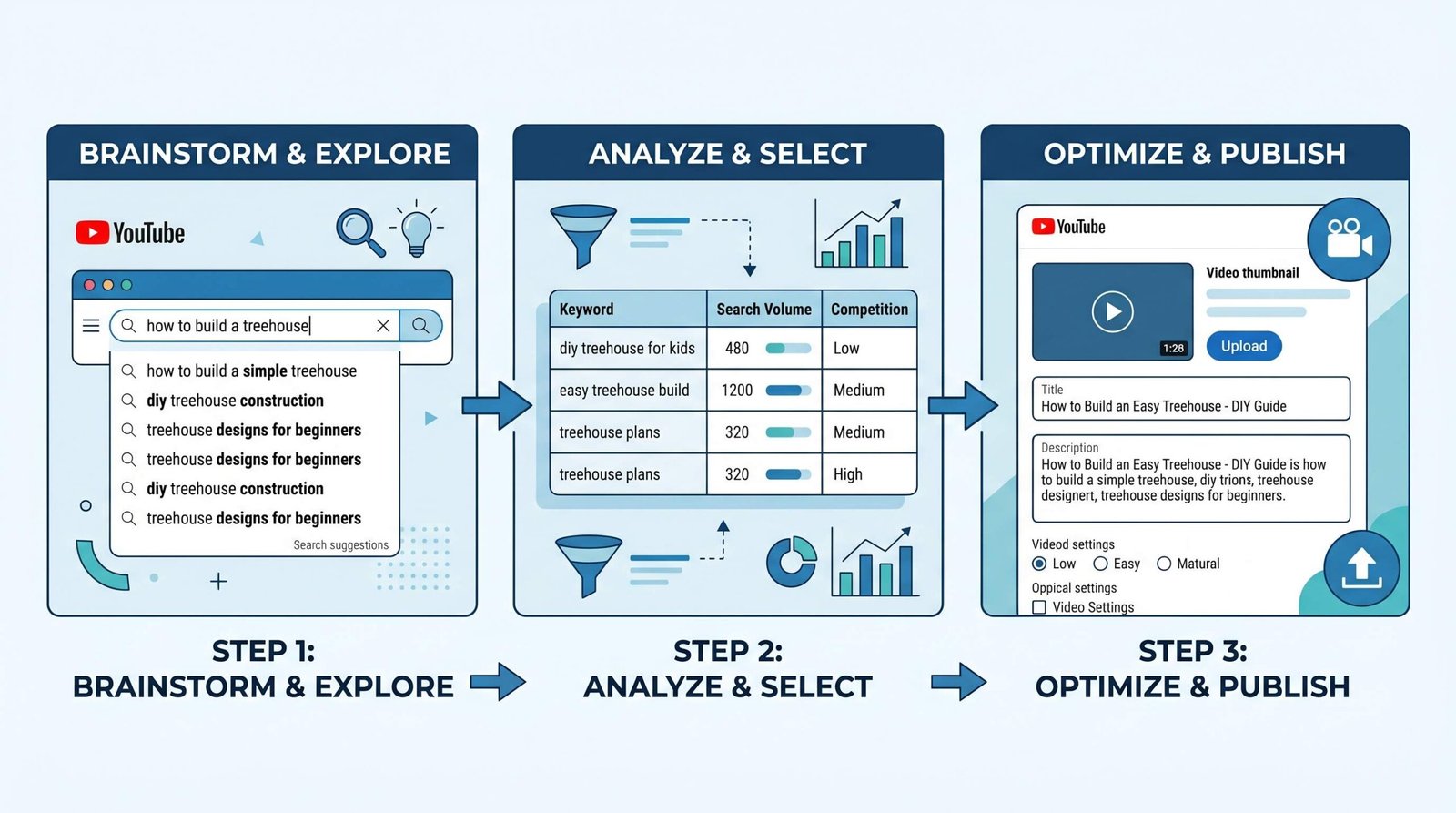
How to Use a YouTube Keyword Generator: A 3-Step Research Workflow
Owning the tools is the easy part. The harder skill is using them in the right sequence so you end up with keywords that actually drive views. Here’s the workflow we follow for every video on a real channel.
Step 1, Generate Seed Ideas
Open VidIQ or keywordtool.io and generate 20 to 30 keyword variations from your topic. The mistake almost every new creator makes is starting with their own video title as the seed. Don’t. Start with the question your viewer is asking.
If you’re filming a video about “how to grow on YouTube,” your seed isn’t “how to grow on YouTube.” Your seeds are the actual phrases viewers type when they need that information: “grow youtube channel,” “get more views youtube,” “increase youtube subscribers,” “youtube channel not growing,” “how to get subscribers fast.” Run each of those through your generator. The variations that come back are the real language of YouTube search, not the way you’d describe the topic from the creator side of the camera.
Dump everything into a spreadsheet. Don’t filter yet. The point of step one is volume of ideas, not quality. You should end with at least 30 candidate keywords from at least two different seed phrases.
Step 2, Filter by Volume and Competition Score
Now you start cutting. Take the candidate list from step one and run it through a tool that shows volume and competition, VidIQ, Ahrefs Keyword Generator, or TubeBuddy if you have access. Apply two filters in order.
First, volume. For a new channel, we suggest a minimum of 100 monthly searches. Anything below that is too small to be worth optimizing for unless the topic is hyperspecific to your niche and you’re certain your audience cares. Cut anything under that threshold.
Second, competition score. On VidIQ’s 0 to 100 scale, look for keywords scoring below 50. On TubeBuddy’s Keyword Score, look for “Good” or “Great.” On Ahrefs, look for keyword difficulty under 30 specifically for YouTube. Cross-reference the same keyword across two tools when you can. If VidIQ says competition is 35 but Ahrefs says difficulty is 70, dig deeper before committing.
Rule of thumb for new channels under 1,000 subscribers: when volume and competition conflict, choose lower competition every time. A keyword with 200 monthly searches and a competition score of 22 will drive far more views to a small channel than a keyword with 5,000 monthly searches and a competition score of 78. You can’t win the second fight yet. You can absolutely win the first.
Step 3, Apply Your Keywords to Video Metadata
You’ve done the research. Now place the keywords where they actually do work, which means three specific spots on every video.
Place your primary keyword in the first 150 characters of your YouTube video description to ensure it shows above the fold on both desktop and mobile. The first sentence of your description is what YouTube’s algorithm weights most heavily for relevance matching.
Your YouTube title optimization is where keyword placement has the most impact on click-through rate. Get the primary keyword into the title, ideally toward the front, while still writing something a human would actually click. Algorithm-friendly and human-friendly aren’t opposites if you write the title carefully.
Use 2 to 3 of your best keywords as YouTube hashtags in your description. Hashtags appear above your title on the video page and create another path for viewers to find your content through hashtag pages. Two to three is the sweet spot, more than that and YouTube ignores them.
If you need help structuring the description itself around your researched keywords, our YouTube description templates give you fill-in-the-blank starting points for different video types.
Free vs. Paid YouTube Keyword Tools: When to Upgrade
The most common question we get is whether the free tools are genuinely enough. The honest answer is: yes, for most creators, for a long time. Here’s how to know when you’ve outgrown the free tier.
Free tools are enough if:
- You’re under 1,000 subscribers and still finding your niche
- You publish once a week or less and only need to research one video at a time
- You mainly need keyword ideas and basic volume estimates, not bulk competitive analysis
- Your videos earn under $500/month, so subscription costs eat meaningfully into channel revenue
Paid tools start paying for themselves when:
- You publish 3 or more videos per week and the daily search caps on free tiers slow you down
- You need bulk keyword analysis across dozens of candidates at once for a content calendar
- You’re running a monetized channel where a 10% lift in views translates to meaningful revenue
- You want competitor tracking, the ability to see which keywords other channels in your niche are ranking for
For most solo creators, the upgrade path looks like this: start with VidIQ free and the YouTube Studio Research Tab. Add Keywords Everywhere when you want inline data. Upgrade to VidIQ paid only once the free daily caps are genuinely limiting your work. If you want a broader comparison of paid and free tools beyond just keyword generators, our best YouTube SEO tools guide covers the full toolkit.
Frequently Asked Questions
Is there a free YouTube keyword generator?
Yes, several. VidIQ’s AI Keyword Generator, Ahrefs Keyword Generator, keywordtool.io, and KeywordToolDominator all offer free tiers that work for real research. The most generous free tier overall is VidIQ’s, which shows volume, competition score, and related keywords without payment. For zero sign-up convenience, Ahrefs Keyword Generator returns up to 100 ideas with volume and difficulty data.
What is the best YouTube keyword tool for beginners?
VidIQ is the easiest entry point for most beginners. The interface explains what each metric means, the competition score is calibrated for YouTube specifically, and the free tier covers the research needs of any creator publishing once or twice a week. Pair it with the YouTube Studio Research Tab as your channel grows, and read our YouTube keyword research guide for a deeper walkthrough of the underlying strategy.
Does VidIQ have a free keyword generator?
Yes. VidIQ’s AI Keyword Generator is free to use, with a daily limit on searches. The free tier shows search volume, a competition score on a 0 to 100 scale, and related keyword suggestions. The AI feature, which generates keyword ideas from a plain-language topic description, is also available on the free plan. Paid plans lift the daily search cap and add bulk export.
How do I find keywords for YouTube?
Start by writing down the questions your viewer is asking, not your video title. Run those seed phrases through a keyword generator like VidIQ or Ahrefs to surface variations. Filter the results by volume (above 100 monthly searches for new channels) and competition (below 50 on VidIQ’s scale). Validate your top candidates in YouTube Studio’s Research Tab if you have an established audience.
What is the difference between YouTube tags and keywords?
Keywords are the broader concept, the search phrases viewers type to find videos. Tags are one specific place you apply those keywords, in the Tags field of your video upload settings. YouTube has stated that tags play a minor role in ranking, but they still help with disambiguation, useful when your topic includes common misspellings or alternate phrasings. Title, description, and on-screen content carry far more weight.
How many keywords should I use for a YouTube video?
Focus on one primary keyword and 2 to 4 secondary keywords per video. Your primary keyword goes in the title, the first sentence of the description, and is naturally spoken in the first 30 seconds of the video. Secondary keywords appear later in the description, in your hashtags, and in your video tags. Stuffing more than 5 keywords dilutes relevance signals and rarely improves ranking.
Is keyword research necessary for YouTube Shorts?
Less critical than for long-form, but still worth doing. Shorts surface primarily through the Shorts feed algorithm, which weights watch time and retention more than search relevance. That said, well-chosen keywords in your Shorts title and description help with cross-discovery, appearing in regular YouTube search results, related video recommendations, and Google search. Light keyword research takes ten minutes and meaningfully expands a Short’s discovery surface.
Does TubeBuddy show keyword search volume for free?
The free version of TubeBuddy shows a Keyword Score and basic suggestions, but the actual search volume estimates and detailed competition analysis are locked to paid plans, starting at the Pro tier. If you specifically need search volume data on a free tier, VidIQ or the Ahrefs Keyword Generator are stronger choices. TubeBuddy’s free tier earns its place primarily through bulk tools and Studio integration rather than its keyword data.