
To write a YouTube description that ranks, lead with your primary keyword in the first 100 characters so it shows above the “Show more” fold on mobile. Then structure the rest in five sections: opening hook, full summary, timestamps, links and CTAs, and hashtags. This framework satisfies YouTube’s search algorithm while giving viewers the context they need to click and stay.
Most creators treat the description box as an afterthought. A spot to dump links, paste a few hashtags, maybe drop in the video title twice for good measure. That habit is costing you views.
YouTube descriptions are the single largest block of structured text YouTube and Google can read about your video. They drive search rankings, suggested video matches, and click-through from the SERP. They also do something videos themselves cannot: convert curious browsers into subscribers, link to your store, and pull in viewers from Google search results that never load the video player.
This guide walks through a five-section framework used by creators in the top one percent of YouTube search. It also covers two areas most guides skip: how descriptions render differently on mobile versus desktop, and how to use YouTube Analytics to keep refining your descriptions after a video goes live.
Why YouTube Descriptions Matter More Than Most Creators Think
Your video file is essentially a black box to a search engine. YouTube and Google can parse some signals from the audio track and on-screen text, but the cleanest indexed text on your video page lives in two places: the title and the description.
Titles are tight. Sixty character maximum, and most creators stop using SEO-rich phrasing once they hit the headline that performs. Descriptions are different. You have 5,000 characters to work with, which is roughly a thousand words of context-rich text that can include your primary keyword, secondary terms, semantically related phrases, links, and timestamps.
Treat the description as a dual-audience document. The first reader is YouTube’s crawler, which uses the text to understand what your video is about and which queries it should answer. The second reader is the human who just clicked your thumbnail and wants to know if they’re in the right place. Both audiences matter. A description that reads like a keyword soup might rank, but it won’t keep viewers around long enough to send positive engagement signals back to the algorithm.
How YouTube Reads Your Description
YouTube’s ranking system looks at a stack of signals when deciding which video to show for a query. Title text carries the most weight, followed by the description, then tags, then closed captions. Each layer reinforces the next. If your title says “kettlebell swing form” but your description never mentions kettlebells, swings, or form, the algorithm has less confidence about what query your video answers.
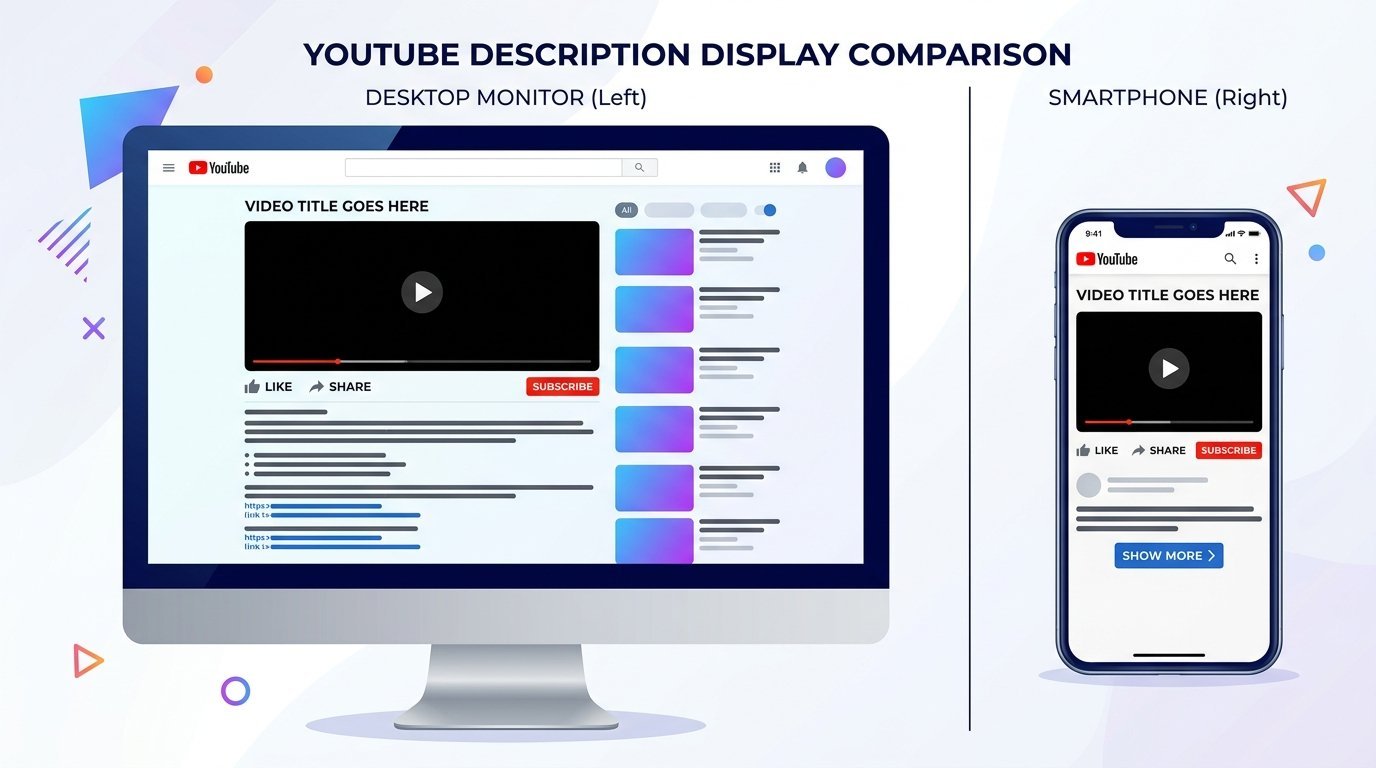
The “Show more” fold matters here too. On desktop, viewers see roughly 157 characters of the description before they have to click to expand. On mobile, that fold appears at around 100 characters. Anything below that line still counts for SEO purposes, but only the part above the fold influences whether a viewer reads any further. Keyword placement, in other words, is not just about including the term, it’s about including the term where humans will actually see it.
YouTube doesn’t reward keyword counting. The algorithm uses natural language processing to understand context, so writing “best kettlebell workout best kettlebell exercises best kettlebell routine” three times in a row signals spam, not relevance. Use your primary keyword once in the first sentence, again naturally in the summary paragraph, and let semantic variants do the rest.
The 5-Section YouTube Description Framework
Every video you publish should follow the same skeleton. The lengths and emphasis shift based on video type, but the structure stays constant. This is what gives your channel a predictable, scannable shape that both viewers and search engines learn to trust.
Section 1 – Opening Hook (0 to 150 characters)
This is the snippet that appears in YouTube search results and in Google’s video carousel. It needs to do three jobs at once: include your primary keyword, promise a clear benefit, and tell the viewer exactly what they’ll learn or get.
The simplest formula that works: [Primary keyword] + [main benefit] + [what they’ll learn].
For a cooking channel video about sourdough, a strong opening looks like this: “Sourdough bread for beginners. Get a bakery-quality crust at home using just flour, water, salt, and a starter, no special equipment needed.”
That sentence runs 142 characters. It front-loads the query (“sourdough bread for beginners”), states the outcome (“bakery-quality crust at home”), and removes the perceived barrier (“no special equipment needed”). Anyone searching for entry-level sourdough content now knows in one glance whether this video matches their intent.
Section 2 – Full Video Summary (150 to 500 characters)
The next three to five sentences expand the hook into a mini blog post about the video. This is where you weave in secondary keywords, semantically related phrases, and the questions you actually answer in the video.
For the sourdough video, this section might read: “In this tutorial we walk through every step of a same-day sourdough loaf, from feeding your starter to scoring the dough before it goes in the oven. You’ll see how to test if your starter is active, the autolyse technique for better gluten development, and how to bake without a Dutch oven if you don’t own one. By the end you’ll have a repeatable process that produces an open crumb and a deep brown crust every time.”
Notice what this section does not include: timestamps, links, or hashtags. Those have their own sections. Mixing them into the summary makes the text feel cluttered to both readers, the algorithm and the human.
Section 3 – Timestamps and Chapters
YouTube automatically converts a list of timestamps in your description into chapter markers on the video timeline, provided you follow three rules. The first timestamp must be 00:00 or 0:00. You need at least three timestamps total. And each chapter must be at least 10 seconds long.
Format each line as MM:SS Chapter Title or HH:MM:SS Chapter Title for videos over an hour. The chapter title should describe what happens in that section, not just label it generically.
A working chapter list for the sourdough video:
- 00:00 What you’ll need before starting
- 01:30 Feeding your starter and the float test
- 04:45 Mixing the dough and autolyse
- 09:20 Stretch and folds explained
- 14:10 Shaping the loaf
- 18:00 Scoring patterns and baking
- 22:15 Crumb reveal and troubleshooting
Chapters also appear as chapter previews in Google search results, which means well-titled chapters can pull search traffic directly to the most relevant moment of your video. That’s a click-through advantage most creators ignore.
Section 4 – Links and CTAs
Resist the urge to dump every link you own into the description. The fourth section should have one primary call to action followed by a tight list of secondary resources. More than five or six links and viewers stop reading, and the algorithm starts looking at link density the way it looks at keyword density.
Order matters. Lead with the single action you want the viewer to take: subscribe, visit a landing page, buy a product, join a newsletter. Then list secondary links such as related playlists, recommended tools, social profiles, or affiliate gear.
If you mention another channel, type @channelname to create a clickable mention. This is one of the most underused features in the description box. It hyperlinks to the channel, notifies the creator that you’ve referenced them, and can lead to collaborations. It also signals to YouTube that your content sits inside a cluster of related channels, which feeds the suggested videos algorithm.
Affiliate links require disclosure. The FTC’s endorsement guidelines apply to YouTube descriptions, so include a short line such as “Some links above are affiliate links and I earn a small commission at no cost to you.” Place it directly under the affiliate links, not buried at the bottom.
Section 5 – Hashtags
Hashtags do two things on YouTube. They categorize your video for topic-based discovery, and the first three appear above the video title as clickable filters. If you include more than three hashtags in the description, YouTube displays the first three above the title. You can add up to 15 in total, though anything over 15 causes YouTube to ignore all hashtags on the video.
Three to five hashtags is the sweet spot for most channels. Place them either at the very end of the description or on a separate line below your links section. Use one broad hashtag for category, one narrower hashtag for niche, and one or two hashtags for the specific video topic.
For the sourdough video: #sourdough #breadbaking #beginnerbaking.
Mobile vs Desktop: How Descriptions Actually Render
The single biggest gap in most description guides is that they assume everyone sees the same thing. They don’t. The first 100 characters of your description carry far more weight than the next 4,900, because most viewers will never scroll past the fold.
YouTube’s mobile app accounts for the majority of watch time on the platform, and the mobile fold is materially tighter than the desktop fold. If you write your hook with desktop in mind, you’ll lose the keyword and the call to action before mobile viewers ever see them.
| Platform | Characters visible | What viewer sees |
|---|---|---|
| Desktop YouTube | ~157 | Opening hook plus partial context |
| Mobile YouTube app | ~100 | First sentence or less |
| Mobile web browser | ~100 | Matches mobile app behavior |
| Google search snippet | ~155 | Same length as your meta description |
The practical rule: write for 100 characters first, then expand for 157. Treat your opening line as a tweet that must include the primary keyword and a concrete benefit. If your hook reads well at 100 characters, it will read even better when the desktop fold gives you another 57 to play with.
This also changes how you handle calls to action. If you’re driving viewers to a landing page or product, the link itself should not sit in the first 100 characters, but a reference to the offer can. “Free sourdough checklist linked below” works as part of the hook and tells mobile viewers there’s something to scroll for.
Interactive Description Features Most Creators Ignore
The description box has evolved past plain text. Several interactive features can turn a static description into a navigation surface that keeps viewers inside your channel ecosystem.
Chapters and timestamps create a clickable table of contents on the video timeline. They also surface as chapter previews in Google search, so well-titled chapters can win their own clicks from search results.
Channel mentions using @username create a hyperlink to that channel and a notification to its creator. Use these for collaborators, sources you cite, or related channels in your niche. They build network effects with the algorithm and open doors for collabs.
Playlist links deserve more attention than they get. Linking to a related playlist in your descriptions can keep viewers inside your channel for an entire session, and session watch time is one of the strongest ranking signals YouTube uses. If you don’t already have curated playlists, building them is one of the highest-leverage tasks you can do for channel growth.
Card-style link previews appear automatically when you link from one YouTube video to another. The preview shows a thumbnail and title, which dramatically increases click-through compared to a bare URL or a plain hyperlink.
Hashtag browse pages are real destinations on YouTube. When a viewer taps one of the hashtags above your title, they land on a feed of every video using that tag. Choosing hashtags that have active browse pages, rather than tags only you use, puts your video in front of viewers actively browsing the topic.
YouTube Description Templates by Video Type
The five-section framework holds across video types, but the emphasis inside each section shifts. A product review needs a strong verdict in the first line. A vlog needs a sense of place. An explainer needs the question you’re answering. Use this matrix as a starting point.
| Video Type | First 100 chars | Key sections to include | Hashtag count |
|---|---|---|---|
| Tutorial / How-to | Lead with the core skill or outcome | Hook, timestamps, tool links | 3-5 |
| Product Review | Lead with product name plus verdict | Hook, timestamps, affiliate link, disclosure | 3-5 |
| Vlog / Lifestyle | Lead with the place or event | Brief personal summary, social links, merch | 2-3 |
| Educational / Explainer | Lead with the question being answered | Hook, chapters, further reading links | 3-5 |
Here is a worked copy-paste template for a tutorial video. Replace the bracketed placeholders with your own content. For a wider set of fill-in patterns including review, vlog, and explainer formats, we keep a library of YouTube description templates you can adapt for any niche.
[Primary keyword] for beginners. [Specific outcome] in [time frame], using [tools or constraints].

In this tutorial we cover [topic A], [topic B], and [topic C]. You'll see [demonstration 1], [demonstration 2], and the most common mistakes to avoid. By the end you'll have [tangible deliverable].

CHAPTERS
00:00 [Intro topic]
01:30 [First step]
04:45 [Second step]
09:20 [Third step]
14:10 [Final result]

LINKS
Primary CTA: [link]
Tools used: [link 1], [link 2]
Related playlist: [link]
Follow on [platform]: @[username]

Some links above are affiliate links and I earn a small commission at no cost to you.

#[broadtopic] #[niche] #[videotopic]
Using YouTube Analytics to Continuously Improve Your Descriptions
Publishing a description is not the end of the job. The single most valuable feature in YouTube Studio for description optimization is the traffic source report, and most creators never open it.
To find it: open YouTube Studio, click Analytics in the left sidebar, click the Reach tab, then scroll to Traffic Sources and click YouTube search. You’ll see a list of the actual search queries driving views to your video. This is real demand data, pulled from real searches that found your content.
What you’re looking for: search terms that are driving views but aren’t in your description. Those are the gaps. If “sourdough without dutch oven” is sending you 200 views a month and the phrase appears nowhere in your description, you’re underranking for a query you already partially own.
The fix is simple. Go back into the description and weave the term into your summary paragraph in a natural sentence. Don’t just paste the phrase at the bottom, and don’t bold or capitalize it. Let it sit inside a full sentence that reads naturally to humans.
Timing matters. Wait until a video has been live for at least 30 days before making your first description update, so you have enough search data to act on. Then review again at 90 days. Videos that have been live for six months or more often have a stable enough query mix that you can tighten the description with high confidence about what’s working.
Pair this analytics loop with active YouTube keyword research when you plan future videos. The terms surfacing in your traffic source report are also clues about which adjacent topics your audience is searching for. YouTube’s official description guidelines point creators toward keyword research tools for exactly this reason, and the Studio data tells you what’s already pulling views before you spend a minute on outside research.
Good YouTube Description vs Bad: Real Examples
Specifics make the difference between a description that ranks and one that gets ignored. Here are two examples written for the same fictional channel, TechWithTara, covering the same hypothetical video about choosing a laptop for video editing.
Bad example:
Best laptop for video editing 2026, laptop video editing, best video editing laptop, laptops for video editing, best laptops 2026, MacBook vs Windows for video editing, best computer for video editing.

Subscribe to my channel: [link]
Follow me on Instagram: [link]
Follow me on TikTok: [link]
Follow me on Twitter: [link]
Join my Discord: [link]
Buy my merch: [link]
Use code TARA at checkout: [link]

#laptop #video #editing #tech #youtube #subscribe #vlog #2026 #review #best
That description fails on every level. The first line is a comma-separated keyword stuffing pattern that screams spam to YouTube’s classifiers. There’s no summary of what the video covers, no timestamps, no hierarchy in the link list. The hashtags are too broad and too many, and there’s no FTC disclosure for what looks like an affiliate code.
Good example:
Best laptop for video editing in 2026, ranked by real export times. We tested four machines under $2,500 to see which one actually handles 4K timeline scrubbing without lag.

I edited the same 12-minute travel sequence on each laptop and measured render speed, fan noise, and battery life under load. You'll see the full comparison, the one model I now use daily, and the laptop I'd avoid even at half the price.

CHAPTERS
00:00 The four laptops we tested
02:15 4K timeline scrub test
06:40 Render times head to head
11:00 Battery life under sustained load
14:30 My pick and the one to avoid
18:00 Who should buy what

LINKS
Full spec comparison sheet: techwithtara.com/laptops-2026
Top pick on Amazon: [affiliate link]
Editing software I use: @teamFinalCut

Some links above are affiliate links and I earn a small commission at no cost to you.

#videoediting #laptopreview #techreview
This version front-loads the keyword “best laptop for video editing in 2026” within the first 100 characters, follows with a benefit (real export times) and a constraint (under $2,500). The summary tells the viewer exactly what they’re getting, the chapters double as a table of contents, the links section has one primary CTA and a tight list of secondary resources, the disclosure is present, and the hashtags are specific to the niche.
Common YouTube Description Mistakes to Avoid
- Front-loading links instead of keywords. The first 100 characters are the most valuable real estate you own. Don’t burn them on a subscribe link.
- Copying and pasting the video title verbatim. The title is already on the page. Duplicating it in the description wastes the space and signals lazy optimization.
- Using the same description on every video. Google treats identical descriptions across multiple videos as thin or duplicate content, which can suppress rankings on every video that shares the template.
- Ignoring mobile rendering. If your hook only works at 157 characters, you’re losing the majority of viewers who never see past 100.
- Keyword stuffing in the first line. Comma-separated keyword soups trigger spam detection and destroy readability for human viewers.
- Not updating descriptions after publishing. Without a feedback loop from analytics, your description is frozen at the version you wrote before you had any real search data.
- Omitting chapters on videos over five minutes. Chapters drive better watch time, surface in Google search, and improve the viewer experience. There’s no reason to skip them.
- Stuffing hashtags. More than 15 hashtags causes YouTube to ignore all of them. Three to five does more work than fifteen ever will.
If you want a faster starting point that handles most of this structure for you, a YouTube description generator can produce a first draft you then customize section by section, rather than rewriting from a blank box every time you publish.
Frequently Asked Questions
How long should a YouTube description be?
Aim for 200 to 500 words of meaningful copy, plus your timestamps, links, and hashtags. Anything shorter under-uses the space; anything longer past 800 words tends to dilute the keyword signal without adding viewer value.
Where do hashtags go in a YouTube description?
Place hashtags either on the last line of the description or on a separate line directly below your links section. YouTube displays the first three hashtags above the video title regardless of where they sit in the text.
What’s the character limit for YouTube descriptions?
YouTube allows up to 5,000 characters per description. Most well-optimized descriptions use 800 to 2,000 characters, including timestamps and links.
How do I add chapters to my YouTube description?
Add at least three timestamps in MM:SS Title format, with the first timestamp set to 00:00 or 0:00. Each chapter must be at least 10 seconds long. YouTube auto-creates clickable chapter markers on the timeline once the criteria are met.
Do YouTube descriptions affect rankings?
Yes. Descriptions are one of the strongest text signals YouTube and Google use to understand what your video is about, alongside the title, tags, and closed captions. A well-written description can move a video several positions in search rankings.
Should I put keywords in my YouTube description?
Yes, but use them naturally. Include your primary keyword in the first 100 characters, repeat it once or twice in the summary paragraph, and let semantically related terms do the rest. Avoid comma-separated keyword lists.
Can I use the same description on multiple videos?
No. Google sees identical descriptions across multiple videos as duplicate content, which can suppress rankings on every video that shares the template. Write a unique opening hook and summary for each video, even if your links and hashtags sections stay similar.
Do hashtags in descriptions help YouTube SEO?
Hashtags categorize your video for topic-based discovery and create clickable filters above the video title. They have a modest effect on rankings but a larger effect on discovery through hashtag browse pages. Three to five well-chosen hashtags is the sweet spot.
How do I see what search terms are finding my video?
Open YouTube Studio, click Analytics, then Reach, then scroll to Traffic Sources and click YouTube search. The report lists actual search queries driving views to your video. Use this data to update your descriptions with terms you’re already ranking for.
Should I optimize my description for mobile?
Yes. Mobile accounts for the majority of YouTube watch time, and the mobile “Show more” fold appears at around 100 characters, compared with roughly 157 on desktop. Write your hook to land cleanly at 100 characters first, then expand. For a deeper walkthrough on cross-platform optimization, see our guide to YouTube SEO tips and the comparison of the best YouTube SEO tools that can audit mobile rendering for you.