

YouTube Hashtags in 2026: How They Actually Work (And Why Instagram Advice Fails Here)
If you have been told to slap 30 hashtags on your YouTube videos like you would on Instagram, you have been given bad advice. YouTube hashtags work fundamentally differently from every other platform, and the gap between what creators expect and what the platform actually does with those #tags is why so many channels see zero lift from them.
Here is the honest truth for 2026: YouTube hashtags are a search and discovery tool, not a feed amplifier. They help viewers find your videos through hashtag pages and search results. They do almost nothing to push your video into the algorithmic recommendation feed. Once you understand that distinction, you can stop wasting effort and start using hashtags strategically.
What are YouTube hashtags? YouTube hashtags are clickable keywords preceded by the # symbol that you add to a video’s title or description. They group videos by topic and create dedicated hashtag pages where viewers can browse related content. Unlike Instagram, YouTube hashtags primarily aid search and discovery rather than expanding feed reach, and YouTube only displays up to three above your video title.

How YouTube Hashtags Actually Work in 2026
A hashtag on YouTube is just a clickable word or short phrase that begins with the pound symbol. Click any hashtag and YouTube takes you to a hashtag page, which is a feed of recent videos tagged with that same word. That hashtag page is the primary discovery surface YouTube created for the feature, and most creators never even look at theirs.
Hashtags can live in two places on a YouTube video: the title and the description. Where they sit changes how they behave, who sees them, and how many actually appear publicly.
The Three-Hashtag Display Rule
Here is the mechanic almost every guide gets wrong. If you do not include hashtags in your title, YouTube grabs the first three hashtags from your description and displays them as clickable links directly above your video title on the watch page. This is prime real estate, sitting in the spot where a viewer’s eye lands the instant the video loads.
If you do place a hashtag inside your title itself, that title hashtag wins and the description ones get demoted. The hashtag links above the title disappear because YouTube does not want to clutter the watch page with duplicates.
Most experienced creators put hashtags only in the description for one practical reason: title space is precious, and a hashtag inside the title eats characters you could spend on a stronger hook. We suggest leaving the title clean and letting YouTube auto-surface your top three description hashtags.
Title Hashtags vs Description Hashtags
Title hashtags are loud. They put the # symbol right inside your headline, which can look cluttered or amateurish if overused. They also count against your 100-character title limit and shrink your room for compelling phrasing. The benefit is that title hashtags read as part of the SEO-relevant headline that gets indexed by both YouTube search and Google video search.
Description hashtags are quieter and more flexible. You can add many of them, place them at the top or bottom, and rotate them per video without rewriting your title formula. The first three description hashtags become the clickable trio above your title, and the rest stay searchable inside the description body. When you are writing your description, we suggest placing your three top hashtags on their own line near the end so they are easy to update video by video.
Do YouTube Hashtags Help You Get More Views?
Yes, but probably not in the way you have been imagining. The answer depends entirely on which discovery surface you are hoping to influence.
Where Hashtags Genuinely Help
Hashtags add real value in two places: search results and hashtag pages. When a viewer searches a hashtag phrase on YouTube, videos that use that hashtag in their title or description get pulled into the result set. The hashtag essentially acts as a keyword signal that confirms your video is about that exact topic.
Hashtag pages are the second surface. Every active hashtag on YouTube has its own browse page that aggregates recent videos using it. These pages are not heavily trafficked compared to the home feed, but they pull a steady trickle of viewers who are specifically hunting for content in a topic. For niche creators, a well-chosen hashtag can drive a small but high-intent audience that converts to subscribers at a much higher rate than feed traffic.
The third quiet benefit is Google search. Google indexes YouTube video pages, and hashtags inside the page can reinforce topical relevance signals. Combined with smart keyword research, hashtags can nudge your video into video rich results on Google for related queries.
Where Hashtags Do Not Help
Hashtags do almost nothing for the home feed, the Up Next sidebar, or browse traffic from the YouTube app’s main surfaces. Those recommendation systems are powered by watch history, click-through rate, average view duration, and topic clustering. Hashtags are a tiny signal at best in those models. If your video is not earning clicks and watch time on its own, no number of #tags will rescue it.
This is the brutal reality that breaks the Instagram mental model. On Instagram, hashtags expand reach because the algorithm uses them to slot your post into topic feeds and explore pages where strangers scroll. YouTube does not work that way. The recommendation engine is built around behavior signals, not hashtag matching, so spamming 30 hashtags hoping for a feed boost is wasted effort.
How Many Hashtags Should You Use on YouTube? The 60-Hashtag Rule
YouTube has a hard rule that very few creators know about, and it can silently kill all your hashtag visibility if you trip it. According to YouTube’s hashtag guidelines, if you add more than 60 hashtags to a single video, YouTube will ignore every single hashtag on the video and may also disregard the video in search results for any hashtag query.
This is not a soft warning. It is a binary penalty. Use 60 or fewer and your hashtags work as intended. Use 61 and YouTube treats your video as if it has no hashtags at all. The threshold also includes hashtags counted across both the title and the description combined.
Beyond the hard ceiling, there is a practical sweet spot that creators have settled into based on what actually drives clicks from hashtag pages and search.
| Hashtag Count | Outcome | Why |
|---|---|---|
| 0 hashtags | Missed opportunity | You lose the clickable trio above your title and any traffic from hashtag pages. |
| 1-2 hashtags | Too few | You leave hashtag page slots empty. YouTube displays whatever you add, so use the full three. |
| 3-5 hashtags (optimal) | Sweet spot | Three appear above your title. Two or three more in the description back them up in search without clutter. |
| 6-15 hashtags | Diminishing returns | Extras stay searchable but viewers never see them. Most creators in this range are just adding noise. |
| 16-60 hashtags | Risky and amateur | Reads as keyword stuffing to viewers reading your description. No additional discovery benefit. |
| 61+ hashtags | All hashtags ignored | YouTube penalty kicks in. Every hashtag becomes invisible and your video can be demoted in hashtag searches. |
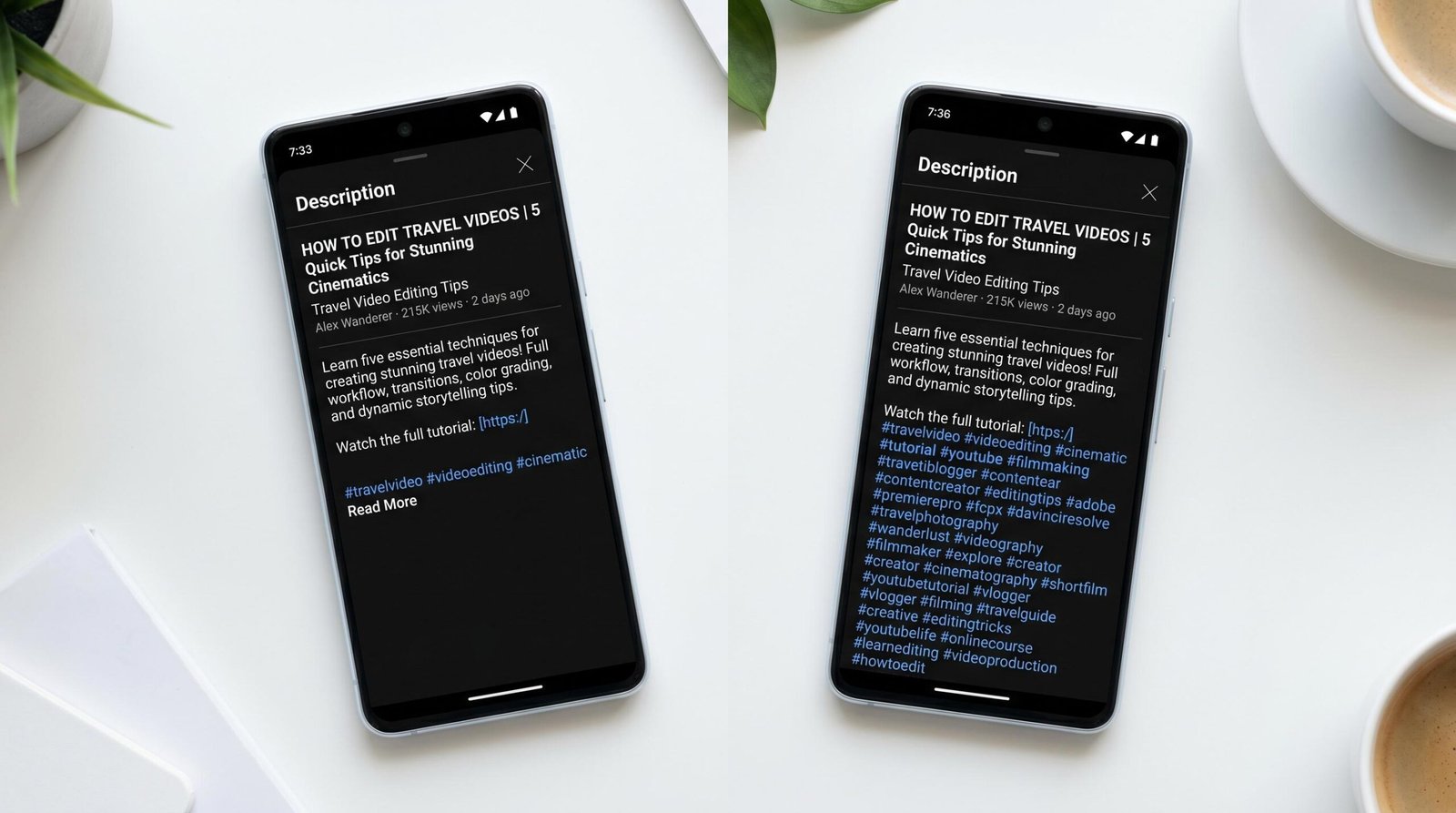
The honest target is three to five hashtags per video. Three guarantees you use the full clickable trio above your title. Two more in the description gives you backup coverage in search results without making the description look stuffed.
YouTube Tags vs Hashtags: What Is the Difference?
This is the single most common point of confusion for new creators. YouTube has two separate metadata fields that both look like keywords, and they are not interchangeable.
Tags are the old-school keyword field hidden in your video’s advanced settings. Viewers never see them. They were once a powerful ranking signal but YouTube has openly said in support documentation that tags now play a minimal role and are mainly useful for handling common misspellings of your channel name or video topic.
Hashtags are the public, clickable, # symbol entries that appear in your title and description. Viewers see them and click them. They drive search visibility and hashtag page traffic.
| Feature | YouTube Tags | YouTube Hashtags |
|---|---|---|
| Visibility to viewers | Hidden in metadata, never shown | Public, displayed above title or in description |
| Clickable? | No | Yes, links to hashtag page |
| Where you add them | Advanced settings field | Inside title or description text |
| Format | Comma-separated keywords | Single words preceded by # |
| Character or count limit | 500 characters total | 15 visible max, 60 hard ceiling |
| Spaces allowed? | Yes, in tag phrases | No, hashtags must be one continuous word |
| Current SEO weight | Minimal, mostly for spelling variants | Meaningful for search and discovery |
| Drives hashtag page traffic? | No | Yes |
The practical takeaway: do not waste energy obsessing over tags. Add a handful of obvious variants and move on. Spend your real strategic effort on hashtags, since those are what viewers actually see and click.
How to Choose the Right YouTube Hashtags
Picking hashtags is part research and part editorial judgment. There are three categories worth thinking about, and a strong video usually mixes them rather than leaning on just one.
Niche and Topic Hashtags
These describe what your video is actually about. If you make videos about espresso machines, your niche hashtags might be #espresso, #espressomachine, #coffeegear, or #baristatips. They are specific enough that the hashtag page audience is genuinely interested in your topic, which means a hashtag-page click is more likely to convert to a watched video and a new subscriber.
Niche hashtags do the heaviest lifting and should make up the majority of your three-to-five hashtag mix. Pull them from your keyword research so they match the actual search language your audience uses.
Branded Hashtags
A branded hashtag is something unique to your channel, like #VideoDescriptionsTips or your show’s name. Almost nobody searches branded hashtags from the outside, so they do not drive new traffic. What they do is create a clickable archive: when a viewer clicks your branded hashtag, they land on a hashtag page filled with only your videos that use it. This is powerful for series, recurring segments, and topic columns inside your channel.
Use one branded hashtag per video if you have a recurring series. Skip it if the video is a standalone topic that does not fit any group.
Trending Hashtags (and Why They Are Risky)
Trending hashtags are the high-volume, news-of-the-moment tags everyone is using. The appeal is obvious: ride a wave, catch some search lift. The risk is twofold.
First, YouTube’s policy is clear that misleading hashtags get videos demoted or removed. If you tag a video #SuperBowl just because the term is trending but your video has nothing to do with football, you are violating the spam policy.
Second, even legitimate trending tags often have hashtag pages dominated by enormous channels, so your video is buried under the established creators within minutes of upload. Trending hashtags work best when the topic is genuinely tied to your video and when you publish quickly enough to ride the front edge of the trend.
YouTube Shorts Hashtags: Different Rules Apply
YouTube Shorts have their own hashtag dynamic that does not perfectly mirror long-form video. The same 60-hashtag ceiling and three-display rule still apply, but two Shorts-specific hashtags carry extra weight.
The #Shorts hashtag itself is a strong signal to YouTube that your video is intended for the Shorts feed rather than the standard long-form watch page. Many creators add it to the title or description even though YouTube usually identifies Shorts automatically based on vertical aspect ratio and length. Adding #Shorts will not hurt and may reinforce the signal in edge cases.
The second is any niche-plus-Shorts combination, like #cookingshorts or #fitnessshorts. These have dedicated hashtag pages that pull genuinely interested viewers, and they tend to be less competitive than the parent hashtag because not every Shorts creator uses them.
Within your Shorts description, hashtag placement is even more critical because Shorts descriptions are tight and viewers rarely expand them. Put your three priority hashtags at the very start of the description so they appear above the title cleanly.
How to Add Hashtags to YouTube Videos (Step-by-Step)
Adding hashtags takes about 30 seconds inside YouTube Studio. Here is the exact flow:
- Open YouTube Studio and go to the Content tab in the left sidebar.
- Click the video you want to edit, or open the upload flow for a new video.
- To add hashtags to the title, simply type them inline as part of the headline, for example: “How to Fix Stuck Espresso Grinders #espresso”. Remember each title hashtag eats character budget.
- To add hashtags to the description, scroll to the description field and type them anywhere in the body. Most creators put them on a dedicated line near the bottom for cleanliness, like: “#espresso #baristatips #coffeegear”.
- Each hashtag must start with # and contain no spaces. Use #baristatips not #barista tips. If you need a multi-word concept, run the words together or use no separator at all.
- Click Save in the top right corner. Hashtags activate immediately on the live video.
For new uploads, you can also use a saved description template with your branded hashtag and a couple of niche placeholders so you never forget to add them. This is the single biggest time-saver if you publish on a regular schedule.
YouTube Hashtag Best Practices for 2026
Once you understand the mechanics, the strategy reduces to a small set of habits. Apply these and you will be ahead of 90 percent of creators who treat hashtags as an afterthought.
Stick to three to five hashtags total. The clickable trio above your title is the only hashtag real estate viewers regularly see. Two more in the description give you search backup without clutter.
Match hashtags to actual search behavior. Do not invent clever hashtags nobody is typing. Use search suggestions in the YouTube search bar, scan competitor videos in your niche, and pull from your keyword research to find tags with proven query volume.
Skip the title hashtag unless it is genuinely useful. Title hashtags eat character budget and rarely outperform a clean, click-worthy headline. Let YouTube auto-display your description hashtags instead.
Never use misleading hashtags. If a viewer clicks expecting one topic and gets another, your retention drops, viewers report your video, and YouTube can demote it. The downside is enormous compared to a slight visibility bump.
Avoid the 60-hashtag cliff. Most creators will not get close to this number, but if you are migrating from Instagram habits, this is the moment to break them. Counting matters.
Use one branded hashtag for series content. A consistent branded tag turns into an archive page over time, which becomes a discovery asset.
Refresh hashtags on evergreen videos. If a video keeps earning views months after upload, swap in newer or more relevant hashtags as your niche vocabulary evolves. This is cheap to do and can quietly extend a video’s life.
Treat hashtags as one slice of a larger strategy. They support your broader YouTube SEO work but they do not replace strong titles, thumbnails, and watch-time-friendly content. If your video is not earning clicks and watch time, hashtags will not save it.
Track which hashtags actually drive traffic. YouTube Analytics shows traffic source breakdowns including hashtag pages. Check the External and Browse sections of your Analytics to see whether specific hashtags are pulling viewers. If a hashtag never appears in your sources after a dozen videos, swap it.
The Quiet Truth About YouTube Hashtags
Hashtags on YouTube are a small, useful tool. They are not a growth hack. Channels that grow do so on the strength of titles, thumbnails, retention, and the quality of the content itself. Hashtags add a measurable but modest contribution by helping the right viewers find videos through search and hashtag pages.
If you use three to five well-chosen hashtags per video, avoid the misleading-tag and 60-tag traps, and pair them with the rest of your metadata work, you will get every bit of value the system has to offer. Spending more time than that on hashtags is energy better invested in your next video.
Frequently Asked Questions
Do hashtags work on YouTube in 2026?
Yes, but in a narrower way than on Instagram or TikTok. YouTube hashtags help your video surface in search results and on dedicated hashtag pages where viewers browse topic content. They have little to no effect on the home feed or recommendation algorithm, which are driven by watch time and click-through rate. Use them for search visibility, not for feed amplification.
How many hashtags should I use on a YouTube video?
Three to five is the sweet spot. Three of them get displayed as clickable links above your title, and the rest support search visibility in your description. Using more than 15 produces diminishing returns, and using more than 60 triggers a penalty where YouTube ignores every hashtag on the video.
What is the YouTube hashtag limit?
YouTube enforces a hard ceiling of 60 hashtags per video, counted across title and description combined. Exceeding this number causes YouTube to disregard every hashtag on the video, and your video may also be demoted in hashtag search results. The practical visible limit is three hashtags, which is how many YouTube displays above your title.
What is the difference between YouTube tags and hashtags?
Tags are hidden metadata keywords you add in advanced settings, which viewers never see and which now carry minimal SEO weight. Hashtags are public, clickable entries marked with the # symbol inside your title or description, which viewers see and click to browse related videos on hashtag pages. Hashtags drive real discovery; tags are mostly useful for handling spelling variants.
Where do hashtags appear on a YouTube video?
If you put hashtags in your title, they appear inline as part of the headline. If you put hashtags only in your description, YouTube takes the first three and displays them as clickable links directly above your video title on the watch page. Hashtags beyond the first three stay searchable inside the description but are not surfaced as links.
What are the best hashtags for YouTube videos?
The best hashtags are specific to your niche, match real search queries, and have active hashtag pages with engaged viewers. Skip broad mega-tags like #youtube or #video that are too competitive to surface in. Mix two or three niche topic hashtags with one branded hashtag for your channel or series, and avoid trending hashtags unless they are genuinely relevant to your video.
Should I put hashtags in my YouTube title or description?
We suggest putting hashtags only in the description for most videos. Title hashtags eat into your 100-character title budget and can make headlines look cluttered. Description hashtags work just as well for search and YouTube still displays the first three of them as clickable links above your title, giving you the same visibility without sacrificing headline real estate.
Do YouTube Shorts use hashtags differently?
The same 60-hashtag ceiling and three-hashtag display rule apply, but Shorts benefit from category-specific tags like #cookingshorts or #fitnessshorts that have dedicated hashtag pages with targeted audiences. The #Shorts tag itself is optional since YouTube identifies Shorts automatically by aspect ratio and length, but adding it does not hurt.
Can YouTube hashtags hurt my video?
Yes, in two specific scenarios. First, using more than 60 hashtags causes YouTube to ignore all of them and may demote the video in hashtag search results. Second, using misleading hashtags that do not match your video’s actual content violates YouTube’s spam policy and can lead to removal or demotion. Stay accurate and stay under the limit and hashtags are a net positive.