

YouTube Description Generator: Create Descriptions That Rank and Convert
A YouTube description generator takes your video topic, target keyword, and basic details, then produces an SEO-optimized description with the primary keyword placed in the critical first 150 characters, timestamp placeholders, hashtag suggestions, and CTA structure. Videodescriptions.com offers a free generator, and understanding how YouTube actually reads descriptions makes the output measurably better.

Most creators write descriptions as an afterthought, dumping a greeting and a list of links into the box thirty seconds before publishing. That habit costs traffic. A solid YouTube description generator fixes the structural problems in seconds, but the creators who get the best results are the ones who understand what the tool is optimizing for. This guide walks through how description SEO actually works on YouTube, how to use a generator without producing generic output, and the templates that consistently outperform free-form writing.
What Is a YouTube Description Generator?
What AI Description Generators Are Actually Doing
A YouTube description generator takes structured input (your video topic, primary keyword, video type, timestamps, CTA links) and produces description text engineered for two readers at once: YouTube’s ranking systems and the human deciding whether to click. The best generators apply the 150-character rule, front-loading your keyword and a specific benefit statement in the portion that appears as the search snippet. They weave in natural keyword variations through the body, format for scannability with timestamps and link sections, and structure hashtags within YouTube’s limits.
This is not autocomplete dressed up with a different label. An AI YouTube description generator applies structural SEO principles consistently across every video you produce. Think of it as a framework engine: the underlying logic about where keywords go, how the first sentence carries the most weight, and how to balance algorithm signals with viewer experience runs every time. Manually applying that framework on every upload is the kind of task creators skip when they’re rushed, which is exactly when description quality drops.
What Generators Can’t Replace
Honest assessment: generators need accurate input. If you type “cooking video” into the topic field and click generate, you get a description that ranks for nothing in particular. Type “Sous vide ribeye temperature chart for 1-inch steaks,” and the same generator produces something targeted and rankable.
The output also needs editing. A generator cannot know that you mentioned a specific knife brand at minute four, that your sponsor changed last week, or that your audience has an inside joke about your previous video. The value a free YouTube description generator provides is speed and structural consistency. You apply the right framework every single video without having to remember the rules. The creator’s knowledge of audience, voice, and the specific value proposition of this particular video still matters, and always will.
Why YouTube Description SEO Matters (The Framework Generators Apply)
How YouTube Uses Descriptions for Ranking
YouTube’s algorithm reads description text to categorize what your video is about and decide which searches it should surface for. Unlike the video itself, which YouTube auto-transcribes with varying accuracy, description text is clean, structured, crawlable data. Keywords placed here directly affect two distinct traffic sources: internal YouTube search and Google web search, which surfaces YouTube videos in organic results for an enormous share of how-to and review queries. Both channels matter, and a well-written description compounds across them.
Google publishes guidance on how it indexes video content for search, and the description is one of the strongest text signals available. YouTube’s own official Help documentation on optimizing video metadata reinforces the same point: descriptions help viewers and search systems understand the video’s content.
The First 150 Characters: Why They’re Worth 10x the Rest
If you remember one thing from this article, make it this: the first 150 to 157 characters of your description carry vastly more weight than everything that follows. Here’s why.
Those characters appear in three high-leverage places. First, they show up as the snippet text in YouTube’s own search results, sitting directly under your title where viewers decide whether to click. Second, they appear in Google search results when your video surfaces for a web query, acting as the meta description for that listing. Third, they’re the only description text visible above the fold on mobile, where the majority of YouTube viewing happens. One block of text doing three high-stakes jobs.
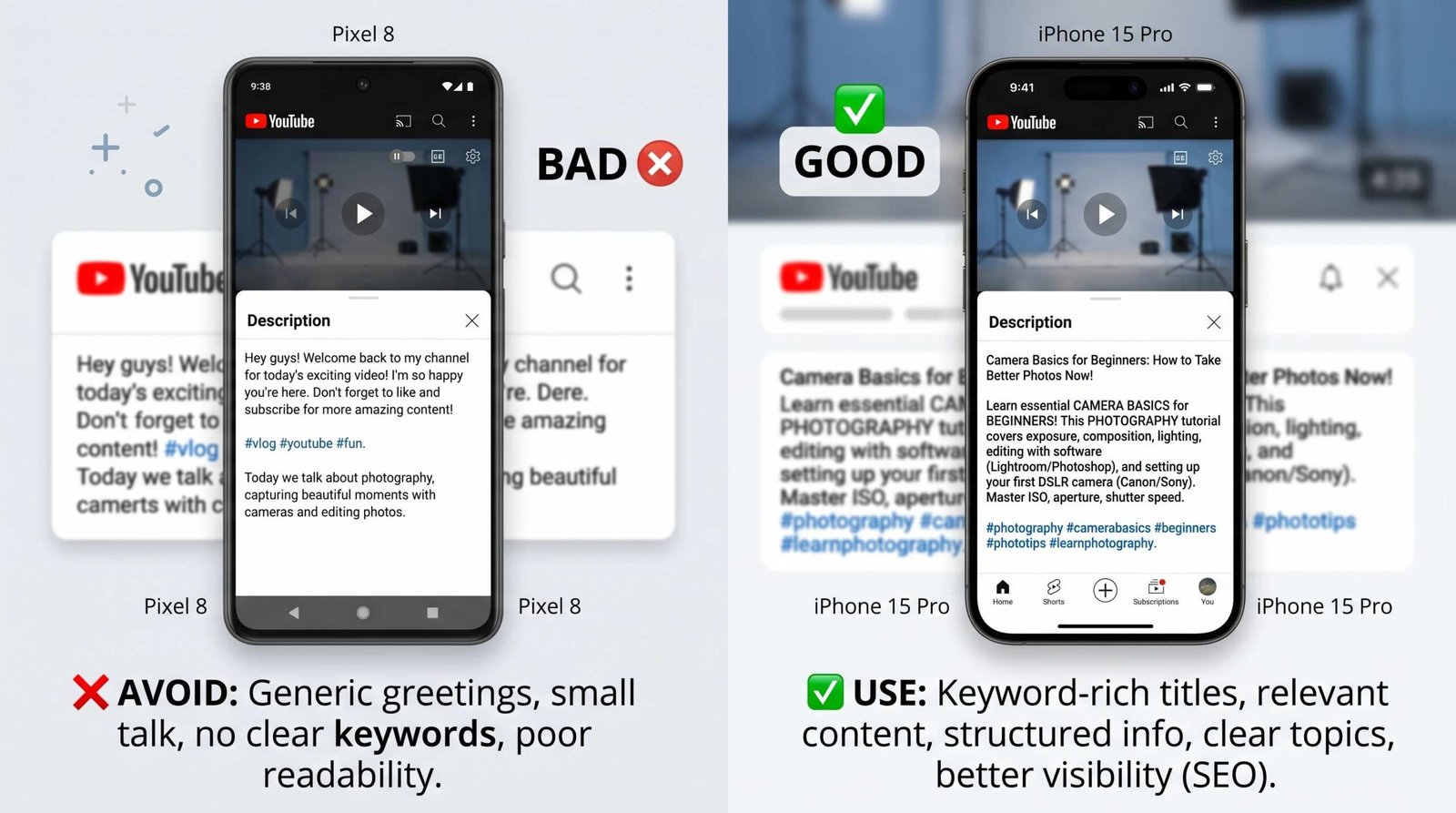
Most creators waste these characters. The standard pattern is a greeting and a setup phrase that says nothing specific. Watch what happens when you compare:
Bad opening: “Hey everyone! Welcome back to the channel. In today’s video, we’re going to be talking about my new favorite cold brew recipe that I’ve been making…”
Good opening: “Cold brew concentrate recipe that stays fresh for 2 weeks in your fridge: 24-hour steep, 1:4 ratio, no special equipment needed. Full method below.”
The good version states the specific outcome, includes searchable keywords (cold brew concentrate, recipe, steep, ratio), signals freshness and convenience benefits, and ends with a hook to read further. The bad version says nothing a viewer or algorithm can use. A generator that defaults to the second pattern is the difference between descriptions that rank and descriptions that decorate. For deeper coverage of the manual approach, our guide on how to write a good YouTube description from scratch walks through the longer playbook.
Keyword Placement Strategy in YouTube Descriptions
Your primary keyword belongs in the first sentence, ideally within the first ten words. Secondary keywords and natural variations should appear through the body of the description in places that read like real writing rather than a stuffed list. YouTube can identify unnatural keyword density, and even if it didn’t, a description that reads like SEO spam destroys click-through and watch-time signals, both of which matter more than text optimization.
Use related terms rather than exact-match repetition. If your primary keyword is “espresso machine review,” supporting language might include “pulled shots,” “milk frothing performance,” “build quality,” and “value for money.” This pattern signals topical depth to YouTube without tripping any of the patterns that get videos demoted.
How to Use a YouTube Description Generator (Step by Step)
Here is the workflow that consistently produces strong output, regardless of which tool you use.
- Enter your video’s primary keyword. Not a topic, not a general theme: the specific phrase someone would type into search to find your video. “Sourdough” is a topic. “Sourdough starter from scratch without commercial yeast” is a keyword.
- Specify video type. Tutorial, review, vlog, explainer, reaction, case study, or interview. Each type has different conventions for what viewers expect in a description.
- Add your timestamps. Even if you do not have them yet, paste in your chapter list or the rough timing for each major section. Generators that include timestamp placeholders produce descriptions that are clearly structured for the algorithm and for viewer navigation.
- Include your CTA link. Your primary call to action, whether that is a subscribe link, a lead magnet, a product page, or a related video. The generator needs to know which link belongs in the prominent position.
- Generate. Run the tool and review the output.
- Edit the output to add personal voice and specific video details the AI could not have known. This step is non-optional. The generator provides structure and SEO scaffolding. You provide the specifics: the moment in the video where you mention a tool by name, the joke from last week’s upload, the exact spec your reviewed product missed. Read the description out loud and ask if it sounds like you. If it does not, rewrite a sentence or two until it does.
This six-step loop typically takes three to five minutes per video. Compare that to either spending fifteen minutes writing every description from scratch or, more commonly, publishing with a hollow description and leaving traffic on the table.
YouTube Description Generator: Comparison by Approach
Not all description tools work the same way. Here is how the major approaches compare on the dimensions that actually affect output quality.
| Approach | How It Works | Best For | Limitations |
|---|---|---|---|
| AI-powered (videodescriptions.com) | Takes keyword and video type as input, generates structured description applying first-150-character rule, keyword variations, and CTA placement | Creators publishing multiple videos per week who need consistent SEO structure without rewriting from scratch | Requires accurate keyword input and a final edit pass for personal voice |
| Template-based | Provides fill-in-the-blank text blocks for each video type, no AI generation | Creators who want full control and only need a starting structure | Manual filling, no keyword optimization built in, output quality depends entirely on the writer |
| Manual with framework | You write from scratch using a checklist of SEO rules | Creators with strong SEO knowledge and time per video | Inconsistent over time, easy to skip steps when rushed, slow |
| Free tools without structure | Generic text generators that produce description-shaped paragraphs without SEO logic | Very low-volume publishing where ranking is not a goal | Output rarely includes proper keyword placement, often misses the 150-character rule entirely |
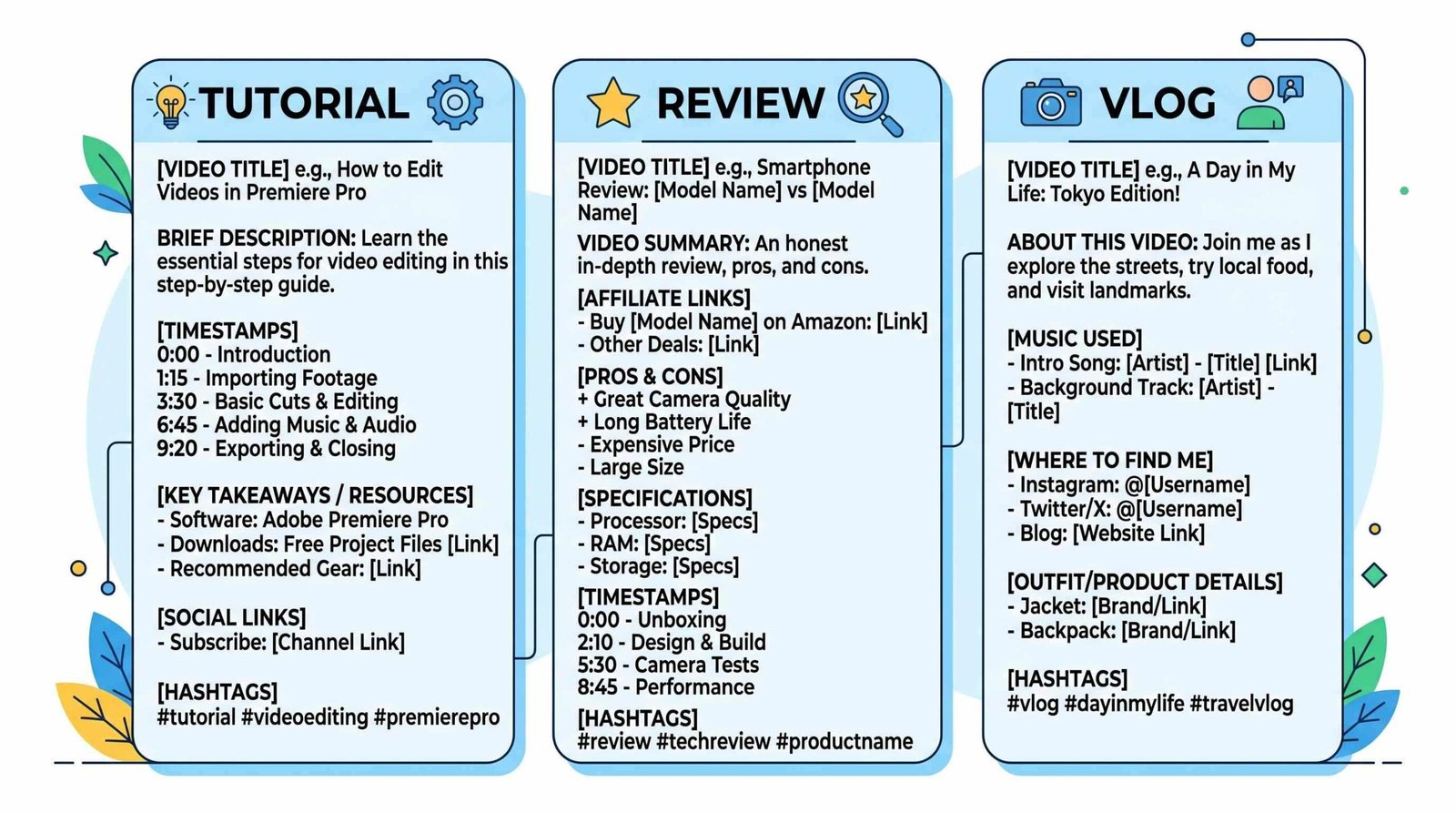
YouTube Description Templates by Video Type
These templates work as starting points whether you use a generator or write manually. Each one front-loads keywords, includes the structural sections YouTube and viewers expect, and leaves room for personal voice.
Tutorial / How-To Description Template
[Primary keyword] tutorial: [specific outcome you'll achieve in this video] in [time / difficulty / cost reference].

What's covered:
- [Step 1 topic]
- [Step 2 topic]
- [Step 3 topic]
- [Step 4 topic]

Timestamps:
00:00 Introduction
00:[XX] [Section 1]
00:[XX] [Section 2]
00:[XX] [Section 3]

Tools and resources mentioned:
- [Resource 1 with link]
- [Resource 2 with link]

Subscribe for more [niche] tutorials: [URL]
Related video: [URL]

#[PrimaryKeyword] #[Niche] #[Audience]
Product Review Description Template
[Product name] review: [one-sentence verdict including primary keyword]. Tested over [time period] for [specific use cases].

Quick verdict:
- Best for: [audience]
- Skip if: [audience]
- Score: [your rating]

Timestamps:
00:00 First impressions
00:[XX] Build quality
00:[XX] Performance testing
00:[XX] Final verdict

Get the product: [affiliate link with disclosure]
Comparison video: [URL]
Subscribe for honest reviews: [URL]

Disclosure: [affiliate or sponsorship language]

#[ProductName] #[Category] #Review
Educational / Explainer Description Template
[Primary keyword]: [the question this video answers] explained in [duration]. Sources and further reading linked below.

Key points covered:
- [Concept 1]
- [Concept 2]
- [Concept 3]

Timestamps:
00:00 The question
00:[XX] [Concept]
00:[XX] [Concept]
00:[XX] Takeaways

Sources and further reading:
- [Source 1]
- [Source 2]

Subscribe for deep dives on [topic area]: [URL]

#[Topic] #Explainer #[Niche]
Vlog / Lifestyle Description Template
[Primary keyword or video hook]: [one specific thing that happened or theme of the day]. [Brief mood or context line.]

In this vlog:
- [Moment 1]
- [Moment 2]
- [Moment 3]

Things mentioned:
- [Product / place / song with link]
- [Product / place / song with link]

Subscribe for weekly vlogs: [URL]
Last week's vlog: [URL]

#Vlog #[YourName] #[Theme]
Common Mistakes Even Description-Generator Users Make
Using a generator does not automatically produce a great description. These are the six mistakes that show up most often, even from creators who have been using tools for months.
- Entering a generic topic instead of a specific keyword. “Fitness” produces generic output. “Dumbbell only shoulder workout for hypertrophy without a barbell” produces targeted output. The specificity of your input determines the specificity of the result.
- Not editing the output to add your actual timestamps. Placeholder timestamps make your description look unfinished and signal to viewers that you did not bother. They also miss the chapter-marker benefit YouTube provides when timestamps are real.
- Using the same generated description structure for every video, regardless of type. A vlog description is not built like a tutorial description. If your generator output reads the same on a 12-minute tutorial and a 4-minute personal update, you are leaving signal on the table.
- Forgetting to add your primary CTA link. Whether that is a subscribe link, a freebie, or a related video, the description is one of the few places viewers actively read for next steps. Empty CTA sections cost conversions.
- Using more than 15 hashtags. YouTube ignores all hashtags on a video when the count exceeds fifteen. Stuffing twenty hashtags means zero hashtag value, not extra reach.
- Not updating older video descriptions when content is still getting traffic. Descriptions are not write-once. If a two-year-old video still pulls views, refreshing the description with current keywords, updated links, and a stronger first 150 characters can lift performance immediately.
YouTube Description Length: How Long Should It Be?
YouTube allows up to 5,000 characters in a description, which is far more than most videos need. Optimal length varies by video type and depends on whether the words you are adding serve either the algorithm or the viewer.
- Tutorials and how-tos: 1,000 to 2,000 characters. You need room for the keyword-rich opening, the chapter list, timestamps, tool and resource links, and a structured CTA section. Tutorials reward depth because they tend to surface in Google search where longer descriptions help context.
- Vlogs and lifestyle: 500 to 800 characters. Conversational tone, a few timestamps if the vlog has distinct segments, links to anything mentioned, and a personal sign-off. Long descriptions on vlogs read as padded.
- Reviews: 800 to 1,500 characters. Enough room for the quick verdict, key specs, chapter list, affiliate disclosure, and links to comparison content.
- Shorts and shorter content: 300 to 600 characters. Front-loaded keyword and a single CTA. Long descriptions on Shorts almost never get read.
The principle: every section of your description should serve either the algorithm (keywords, structure, links) or the viewer (context, resources, navigation). Filler for length’s sake hurts conversion without helping ranking.
Frequently Asked Questions About YouTube Description Generators
Are YouTube description generators free?
Many are. Videodescriptions.com offers a free YouTube description generator with no signup wall for the core tool. Paid tiers across the market typically add features like bulk generation, brand voice tuning, and templates rather than gating the fundamental functionality.
Do YouTube description generators improve rankings?
They improve rankings indirectly by producing descriptions that follow the structural patterns YouTube and Google reward: keyword in the first sentence, natural keyword variations through the body, proper formatting with timestamps and links. The generator itself does not rank videos. The well-structured descriptions it produces give your videos a fair shot at ranking for the keywords you target.
Can I use the same description for multiple videos?
No. Duplicate descriptions confuse YouTube about which video should rank for a given keyword, and they signal low-effort content to viewers who click on a related video and see the same text. Use the same template structure across videos. Write unique opening lines, timestamps, and specific details every time.
How long should my YouTube description be?
Vary by type. Tutorials need 1,000 to 2,000 characters, reviews land at 800 to 1,500, vlogs work at 500 to 800, and Shorts stay under 600. The 5,000 character ceiling is not a target. Use the space you need to serve the algorithm and the viewer, then stop.
Do hashtags in descriptions help YouTube SEO?
A modest amount. Three to five relevant hashtags help YouTube understand topic context and place your video alongside related content. Exceeding fifteen hashtags causes YouTube to ignore all of them, so more is not better.
How often should I update my YouTube descriptions?
Audit your top ten performing videos every quarter. If a video still pulls steady traffic, refresh the first 150 characters with current keywords, update any broken links, and check that your primary CTA still points to the right destination. Older videos with refreshed descriptions often see immediate lift because the opening lines were never optimized in the first place.